
What is OpenVPN? How it Works & When to Use?
- 12 月 14, 2025
- 8 分钟阅读
- VPN Fundamentals

When people talk about 可靠的VPN connections, OpenVPN often comes up as the gold standard. This open-source protocol has been protecting internet users since 2001, and there’s a good reason why it remains so popular today.
Why OpenVPN Stands Out
Key Differentiators:
- Open-source transparency: Anyone can examine the code for vulnerabilities
- Dual protocol support: Works with both TCP and UDP transport protocols
- Universal compatibility: Functions on virtually any device or operating system
- Proven track record: 20+ years of real-world security validation
- Enterprise-grade features: Scales from individual use to thousands of connections
目录
- Why OpenVPN Stands Out
- What Is OpenVPN?
- How OpenVPN Works
- 安全特性
- TCP vs UDP: Choosing Your Protocol
- Real-World Applications
- 2026 Security Status
- Performance Expectations
- Troubleshooting Common Issues
- Protocol Comparison Matrix
- Installation Quick Guide
- Choosing the Right Setup
- Performance Optimization
- Limitations to Consider
- Future of OpenVPN
- Quick Decision Guide
- 常见问题 (FAQ)
What Is OpenVPN?
OpenVPN is both a protocol and software that creates secure connections between your device and a VPN server. Created by James Yonan in 2001, it operates as a secure tunnel protecting your internet traffic from prying eyes.
Core Components:
- Protocol – The communication standard
- Server software – Runs on VPN servers
- Client applications – Connects your devices
- Configuration files – Contains connection settings
How OpenVPN Works
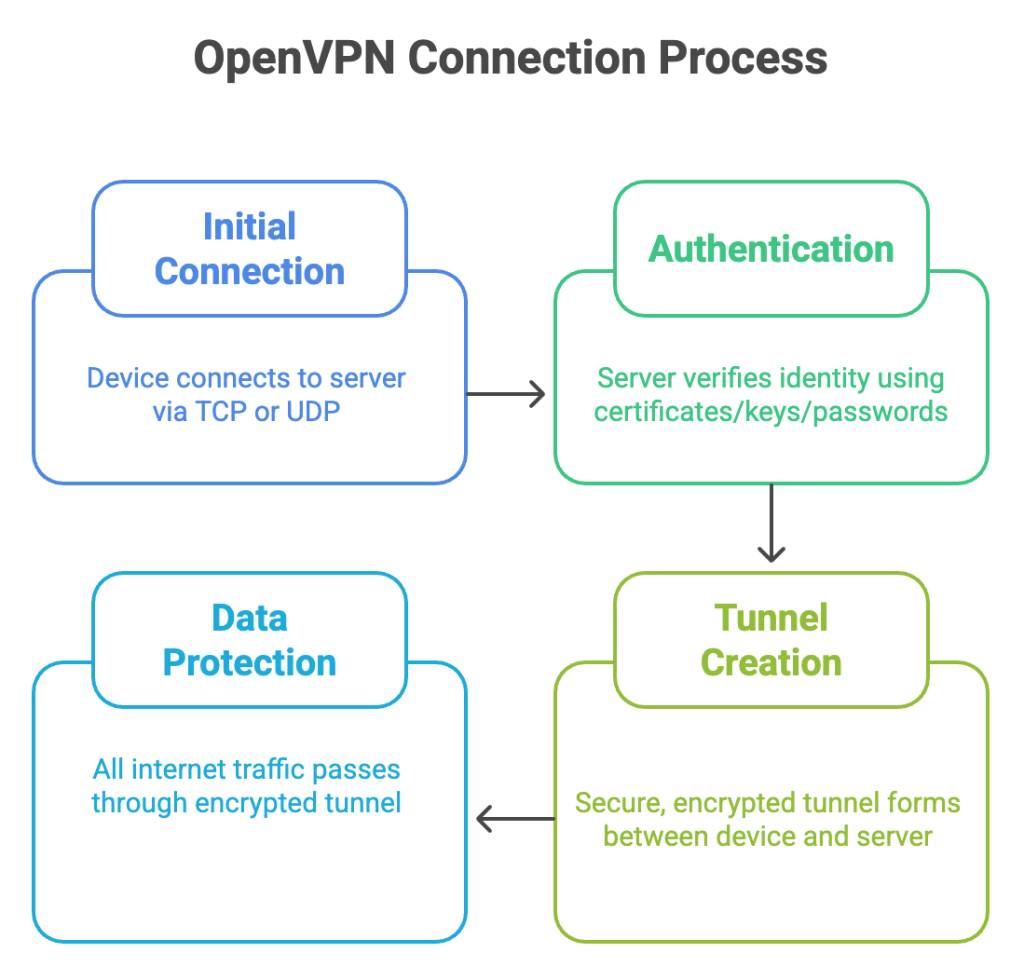
| Step | Process | Description |
| 1 | Initial Connection | Device connects to OpenVPN server via TCP or UDP |
| 2 | 验证 | Server verifies identity using certificates/keys/passwords |
| 3 | Tunnel Creation | Secure, encrypted tunnel forms between device and server |
| 4 | 数据保护 | All internet traffic passes through encrypted tunnel |
安全特性
Encryption Standards
- AES-256 加密 – Military-grade protection (default)
- ChaCha20-Poly1305 – Alternative encryption method
- SSL/TLS protocols – Same technology securing online banking
Authentication Options
- Pre-shared keys – Simple, effective for small setups
- Certificate-based – More secure for business use
- Username/password – Easy for everyday users
- 多重身份验证 – Extra security layer
Advanced Protection
- 完美的前向保密 – New encryption keys for each session
- Multiple cipher support – Flexibility for different security needs
- IP泄漏保护 – Prevents DNS and WebRTC leaks
TCP vs UDP: Choosing Your Protocol
Here’s a quick overview on TCP vs UDP.
| 特征 | UDP Mode | TCP Mode |
| 速度 | ⭐⭐⭐⭐⭐ Fast | ⭐⭐⭐ Moderate |
| 可靠性 | ⭐⭐⭐ Good | ⭐⭐⭐⭐⭐ Excellent |
| Gaming | ⭐⭐⭐⭐⭐ Ideal | ⭐⭐ Poor |
| 流 | ⭐⭐⭐⭐⭐ Excellent | ⭐⭐⭐ Good |
| 防火墙绕过 | ⭐⭐ Limited | ⭐⭐⭐⭐⭐ Excellent |
| Unstable Networks | ⭐⭐ Poor | ⭐⭐⭐⭐⭐ Excellent |
Quick Recommendations:
- Choose UDP for: Gaming, streaming, general browsing, video calls
- Choose TCP for: File transfers, restrictive networks, unreliable connections
Real-World Applications
远程工作解决方案
- Secure company access – Connect to office networks from anywhere
- File sharing – Access company resources safely
- 可扩展性 – Support hundreds or thousands of simultaneous connections
- Cross-platform – Works on all major operating systems
绕过限制
- Censorship circumvention – Get around internet blocks
- 地理限制 – Access region-locked content
- Port 443 operation – Mimics regular HTTPS traffic
- Deep packet inspection resistance – Harder to detect and block
Public WiFi Protection
- Data encryption – Protects personal information on unsecured networks
- Identity protection – Prevents tracking and monitoring
- Banking security – Safe online transactions on public networks
- Email privacy – Secure communication in coffee shops, airports, and hotels
2026 Security Status
Security Audit Results:
- A recent Trail of Bits audit found no significant vulnerabilities
- Open-source transparency enables continuous security reviews
- 20+ years of real-world testing prove reliability
- Military-grade AES-256 encryption remains unbreakable
Current Threat Resistance:
- Quantum computing threats – Currently secure, post-quantum crypto in development
- Government surveillance – Strong protection with proper implementation
- Corporate monitoring – Effective against deep packet inspection
Performance Expectations
Speed Benchmarks
| Mode | Speed Retention | Typical Use Cases |
| UDP协议 | 80-90% | Gaming, streaming, browsing |
| 传输控制协议 | 60-75% | File transfers, restrictive networks |
Latency Impact
- Nearby servers: +5-15ms additional latency
- Distant servers: +20-50ms additional latency
- Gaming impact: Minimal with UDP mode
Battery Usage (Mobile)
- High usage: More battery consumption than newer protocols
- Optimization tips: Use UDP mode, choose nearby servers
- Background impact: Moderate drain during extended sessions
Troubleshooting Common Issues
| 问题 | Quick Solution | Advanced Solution |
| Frequent disconnections | Switch to TCP | Adjust keep-alive settings |
| Slow speeds | Use UDP, closer server | Optimize MTU size |
| Streaming blocks | Change server location | Use obfuscation features |
| Work/school blocks | TCP on port 443 | Configure custom ports |
| Mobile instability | Enable auto-reconnect | Adjust power saving settings |
Protocol Comparison Matrix
| 特征 | 开放VPN | 线卫 | IKEv2 | L2TP/IPSec |
| 安全 | ⭐⭐⭐⭐⭐ | ⭐⭐⭐⭐⭐ | ⭐⭐⭐⭐ | ⭐⭐⭐ |
| 速度 | ⭐⭐⭐ | ⭐⭐⭐⭐⭐ | ⭐⭐⭐⭐ | ⭐⭐ |
| 兼容性 | ⭐⭐⭐⭐⭐ | ⭐⭐⭐ | ⭐⭐⭐⭐ | ⭐⭐⭐⭐ |
| Setup Difficulty | ⭐⭐ | ⭐⭐⭐⭐ | ⭐⭐⭐⭐⭐ | ⭐⭐⭐ |
| 防火墙绕过 | ⭐⭐⭐⭐⭐ | ⭐⭐ | ⭐⭐⭐ | ⭐⭐ |
| Open Source | ✅ | ✅ | ❌ | ❌ |
Installation Quick Guide
Windows Setup
- 下載 OpenVPN Connect from the official website
- Install with administrator privileges
- Import .ovpn configuration file
- Connect to your chosen server
Mobile Setup (iOS/Android)
- 下載 OpenVPN Connect from the app store
- Transfer configuration file (email/cloud)
- Import config within the app
- Connect with one tap
Router Installation
- Compatible routers: ASUS, Netgear, Linksys models
- Custom firmware: DD-WRT, OpenWrt support
- Benefits: Protects all connected devices automatically
Choosing the Right Setup
Personal Use Recommendations
| User Type | Best Option | 主要特征 |
| Beginner | Commercial VPN service | Pre-configured, user-friendly |
| Privacy-focused | Self-hosted server | Complete control, no logs |
| Traveler | Mobile-optimized service | Auto-reconnect, server switching |
| Streamer | Service with streaming servers | Geo-unblocking, fast speeds |
Business Considerations
- Small teams (1-20): OpenVPN Access Server
- Medium business (20-100): Commercial VPN with management
- Enterprise (100+): Custom deployment with LDAP integration
- Remote workforce: Cloud-based VPN solutions
Performance Optimization
Speed Enhancement Tips
- Protocol choice: Start with UDP, switch to TCP if needed
- Cipher selection: AES-128 for speed, AES-256 for maximum security
- Server distance: Choose geographically closer servers
- MTU optimization: Adjust packet size for your network
Security vs Speed Balance
| Priority | Configuration | Trade-offs |
| Maximum Security | AES-256, TCP, compression off | Slower speeds |
| Balanced | AES-256, UDP, optimal MTU | Good security, decent speed |
| Maximum Speed | AES-128, UDP, nearby servers | Slightly less security |
Limitations to Consider
Performance Limitations
- Speed overhead: 10-40% speed reduction is typical
- CPU usage: Higher than some newer protocols
- Mobile battery: More drain than lightweight alternatives
Technical Limitations
- Setup complexity: Manual configuration requires networking knowledge
- Legacy hardware: Some older equipment needs updates
- Packet overhead: 5-15% additional data usage
兼容性问题
- Some networks: May block OpenVPN traffic
- Corporate firewalls: Might require TCP mode on port 443
- Mobile carriers: Occasional connection issues
Future of OpenVPN
Current Developments:
- Post-quantum cryptography – Preparing for quantum computing threats
- Mobile optimization – Improving battery life and connection stability
- Cloud integration – Better support for cloud-based deployments
- Performance improvements – Ongoing speed and efficiency enhancements
Industry Position:
- Remains the most widely supported VPN protocol
- Continues to evolve while maintaining backward compatibility
- Standard choice for enterprise and commercial VPN services
Quick Decision Guide
Choose OpenVPN if you need:
✅ Maximum compatibility across devices
✅ Proven security track record
✅ Ability to bypass network restrictions
✅ Enterprise-grade features
✅ Open-source transparency
Consider alternatives if you prioritize:
❌ Maximum speed over features (WireGuard)
❌ Native OS integration (IKEv2)
❌ Simplest possible setup (built-in protocols)
❌ Lowest battery usage (lighter protocols)
常见问题 (FAQ)
Yes, the OpenVPN protocol is open-source and free.However, you’ll need a VPN service or self-hosted server to connect to.
Some providers offer free tiers with limited features.
ISPs can see you’re using a VPN but can’t see your actual traffic. OpenVPN using TCP port 443 is harder to detect since it mimics regular HTTPS traffic.
OpenVPN is legal in most countries, but VPN usage may be restricted in some regions like China, Russia, and UAE. Check your local laws before use.
Yes, OpenVPN provides strong encryption for P2P activities. Choose UDP mode for better speeds and ensure your VPN provider allows torrenting.
OpenVPN adds 5-15% overhead to your data usage due to encryption headers and protocol overhead. The exact amount depends on your encryption settings.
OpenVPN connections are often blocked in China. If it works, use TCP mode on port 443 with obfuscation features, but success isn’t guaranteed.
This depends on your VPN service’s policy, not OpenVPN itself. Most commercial services allow 3-10 simultaneous connections per account.
No, OpenVPN only encrypts your internet connection. You still need antivirus software to protect against malware, viruses, and local threats.
OpenVPN Connect is the official app with basic features. Third-party apps may offer additional features like kill switches, split tunneling, or better interfaces.
OpenVPN itself doesn’t log activity – that depends on your VPN provider’s policy. Choose providers with verified no-logs policies for privacy.
Yes, OpenVPN with AES-256 encryption is secure for banking. However, avoid public WiFi for sensitive transactions and ensure you’re connecting to legitimate banking sites.
Update whenever security patches are released. Most VPN apps auto-update, but manually check for updates monthly if using self-hosted setups.
VPN speeds depend on server load, distance, encryption overhead, and your base internet speed. Try different servers and switch to UDP mode for better performance.
OpenVPN remains the gold standard for VPN security in 2026, offering unmatched flexibility and proven protection.
While newer protocols may offer faster speeds, OpenVPN’s comprehensive feature set, enterprise capabilities, and two decades of security validation make it the reliable choice for users who prioritize security and compatibility over raw performance.
![Ultimate White Label VPN Business Guide 2026 [Cost & ROI]](https://symlexvpn.com/wp-content/uploads/2026/01/Ultimate-White-Label-VPN-Business-Guide-2025-Cost-ROI_2-376x114.webp)