
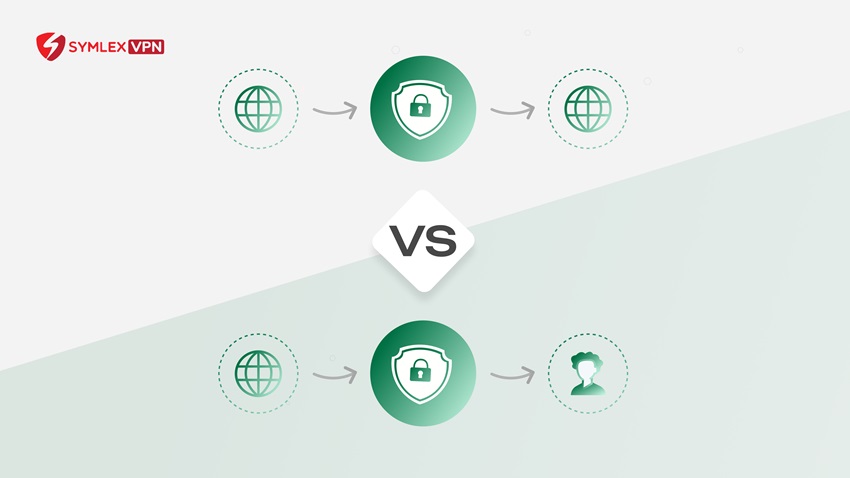
Exactly what brings us to the comparison of Site-to-site vs. Client-to-site VPN? A site-to-site VPN connects one network to another network. A client-to-site VPN connects an individual device to a private network.
Site-to-site VPNs are usually designed for offices, branches, data centers, or cloud networks. Likewise, client-to-site VPNs suit individual employees working from home, traveling, or connecting from another location.
Both use encrypted VPN tunnels, but their setup, authentication, management, and use cases differ.
What is a site-to-site VPN?
A site-to-site VPN creates an encrypted connection between two networks.
For example, a company may have its main office in one city and a branch office in another. Each location has its own local network. A site-to-site VPN can connect those networks so approved devices can communicate across the VPN tunnel.
- Cisco describes site-to-site VPNs as network-to-network connections that can link corporate offices and branch locations over the internet. Cisco
- Microsoft Azure also uses site-to-site VPN connections to connect an on-premises network with an Azure virtual network through an IPsec/IKE tunnel. Microsoft Learn
How a site-to-site VPN works
A typical connection works like this:
- Step 1: Configure a VPN gateway or compatible device at each network.
- Step 2: The gateways authenticate each other.
- Step 3: They establish an encrypted VPN tunnel.
- Step 4: Network routing determines which traffic should enter the tunnel.
- Step 5: Traffic moves securely between the connected networks.
- Step 6: Users inside those networks can access approved resources according to company permissions.
Employees often do not need to manually connect a VPN application because the VPN gateway handles the network connection.
What is a client-to-site VPN?
A client-to-site VPN connects one device to a private network. It is commonly used for remote employees. A worker may open a VPN application on a laptop, authenticate, and establish an encrypted connection to the organization’s VPN gateway.
- This model is also commonly called a remote-access VPN. Microsoft uses the term point-to-site for a similar connection model in Azure.
- A point-to-site connection starts on an individual client computer and connects that device to an Azure virtual network.
How a client-to-site VPN works
The process generally looks like this:
- Step 1: The employee opens an approved VPN client.
- Step 2: The client contacts the organization’s VPN gateway.
- Step 3: The user or device is authenticated.
- Step 4: The system creates an encrypted tunnel.
- Step 5: The device receives access based on configured permissions and routing.
- Step 6: Approved work traffic can then travel through the VPN connection.
Organizations may use passwords, certificates, MFA, identity providers, or other approved authentication methods.
Site-to-site VPN vs client to site VPN comparison
Here is a simple site-to-site VPN vs. client-to-site VPN comparison.
| Feature | Site-to-site VPN | Client-to-site VPN |
| Connection | Network to network | Device to network |
| Common users | Offices and branches | Remote employees |
| User action | Usually automatic at gateway level | User often starts VPN client |
| VPN software on each device | Usually not required | Usually required |
| Authentication | Gateway or network authentication | User or device authentication |
| Common protocols | Often IPsec/IKE | OpenVPN, IKEv2/IPsec, SSL/TLS-based options |
| Typical purpose | Connect locations | Connect individual remote users |
| Management | Network-focused | User and endpoint-focused |
| Scalability | Good for permanent locations | Good for distributed users |
Neither option is automatically more secure. Security depends on protocol choice, encryption, authentication, configuration, updates, access rules, and endpoint protection.
Site-to-site VPN: Pros and cons
Understanding site-to-site VPN pros and cons can help businesses decide if it fits their network design.
Advantages of a site-to-site VPN
| Advantage | What it means |
| Connects entire networks | Approved devices at one location can communicate with resources at another location without each device creating a separate VPN connection. |
| Useful for branch offices | Businesses can connect headquarters, branch offices, and other locations through private network connections. |
| Centralized management | Administrators can manage routing and VPN settings at the gateway level instead of configuring every employee separately. |
| Supports hybrid networks | A site-to-site VPN can connect on-premises networks with cloud virtual networks. |
Limitations of a site-to-site VPN
| Limitation | What it means |
| Requires more infrastructure | A compatible gateway, router, firewall, or VPN appliance is typically needed. |
| Can be more complex to configure | Administrators may need to set up routing, IP ranges, authentication, encryption settings, and firewall rules. |
| Less suitable for individual remote users | Site-to-site VPNs are mainly designed to connect networks. Remote employees usually need a client-to-site or remote-access VPN instead. |
Client-to-site VPN: Advantages and limitations
Advantages of a client-to-site VPN
| Advantage | What it means |
| Suitable for remote work | Employees can connect from home, hotels, coworking spaces, or other approved networks. |
| Individual authentication | Each user can be authenticated separately, which supports user-specific access controls. |
| Flexible for distributed teams | Businesses do not need to install a full network gateway at every location where an employee works. |
| Supports MFA | Client-to-site VPN access can be combined with multifactor authentication and identity management for stronger account protection. |
Limitations of a client-to-site VPN
| Limitation | What it means |
| Each endpoint needs management | VPN software, certificates, device settings, updates, and authentication methods may need ongoing management. |
| Performance can vary | Speed and stability can depend on the user’s internet connection, VPN server location, network congestion, protocol, and company infrastructure. |
| Endpoint security still matters | A VPN does not make an infected or poorly secured device safe. Devices still need updates, access controls, and suitable endpoint protection. |
Site-to-site VPN vs remote VPN
The phrase site-to-site VPN vs remote VPN usually describes the same basic difference.
- A site-to-site VPN links networks.
- A remote-access or client-to-site VPN links an individual endpoint to a network.
Businesses may use both at the same time.
For example, a company could use a site-to-site VPN to connect its main office to a branch while giving remote employees client-to-site VPN access.
Which VPN type should a business use?
The answer depends on what needs to connect.
Choose a site-to-site VPN when you need to:
- Connect a headquarters network to branch offices
- Link two business locations
- Connect an office network with a cloud network
- Maintain an ongoing network-to-network connection
- Route traffic between approved private networks
Choose a client-to-site VPN when you need to:
- Support remote employees
- Connect individual laptops or devices
- Provide secure access during business travel
- Authenticate employees individually
- Apply user-specific remote access controls
Many organizations need both. A company with multiple offices and remote employees might use site-to-site tunnels between locations while also offering client-to-site access for staff working outside those offices.
Final thoughts
The main difference between site-to-site VPN vs. client-to-site VPN is what the tunnel connects.
A site-to-site VPN connects networks and is useful for offices, branches, cloud networks, and other permanent locations.
A client-to-site VPN connects an individual device to a private network and is commonly used for remote employees.
When comparing client to site VPN vs. site-to-site VPN, focus on network design, number of users, authentication requirements, access controls, and how employees work.
FAQs
Client-to-site VPN generally refers to a remote-access model where an individual device connects to a private network. Different vendors may use terms such as remote access VPN or point-to-site VPN.
Usually not. Network gateways or VPN devices usually handle the VPN connection. Individual computers communicate through those gateways.
Often yes. Users may need a VPN client or built-in operating system VPN functionality. The exact setup depends on the protocol and service.
Client-to-site VPNs are generally designed for individual remote users. Site-to-site VPNs are better suited to connecting full networks.
Yes. Site-to-site and client-to-site connections can serve different purposes in the same network architecture.